Saturday, July 16, 2011

cara membuat banyak id yahoo


Halo Kawan2 , Bagi yang susah Bikin ID yahoo,mau buat facebook Banyak2,Twitter Banyak2 .jangan khawatir gk usah lagi capek nunggu loading yang lama dari internet,Karena udah ada toolsnya buat id yahoo sebanyak banyaknya

Nama Toolsnya : IR-IDmakers


Cara menggunakannya langsung saya kasih Video !


Bagi yang inetnya Lemot nih Pict Cara makenya dari 1 Sampe 5


Untuk Download Langsung Sedot Dimari yah =

MEDIAFIRE

User script greasemonkey

Sudah anda mengenal atau menggunakan Greasemonkey? Greasemonkey adalah sebuah add-on bagi Firefox (dan produk mozilla lain, sama seperti themes) yang mengaplikasikan sebuah script (tepatnya javascript) ke sebuah web yang anda kunjungi, mulai dari mengubah warna, tema, tulisan bahkan melakukan aksi otomatis seperti login dan download.

Jika masih belum menggunakannya, silakan coba greasemonkey disini, install dan restart firefox anda 

Caranya simple, Setelah greasemonkey selesai terpasang, saatnya anda menginstall script customnya. Silakan kunjungi ratusan script itu di Userscript.org. Pilih salah satu script, Klik tombol Install pada halaman tersebut.

Jika kompatibel, maka script akan diinstall setelah anda mengkonfirmasi (tekan OK) jika ada dialog yang meyatakan ada script baru diinstall.

Nah, sekarang untuk demonstrasi kehebatan Greasemonkey, silakan coba Sepuluh Script Greasemonkey berikut:

1. Google Account Multi-login
Gunanya jika anda mempunyai lebih dari satu akun Google misalnya Gmail dan Blogspot, anda tak perlu logout, karena Greasemonkey akan otomatis mengatur anda untuk switch ke akun anda yang lain.
Kunjungi scriptnya disini : http://userscripts.org/scripts/show/16341

2. Helvetireader:
Gunanya untuk mengubah layout Google Reader anda menjadi merah-putih dengan font helvetica.
Kunjungi webnya disini : http://helvetireader.com/

3. Download YouTube Video as Mp4
Dengan script ini anda tak butuh lagi addon baru untuk download dari Youtube, atau tak akan perlu lagi mengunjungi situs convert link youtube semacam KeepVid.com. Dengan script ini greasemonkey akan mencantumkan link download Video di Youtube yang sedang anda lihat dengan format MP4.
Kunjungi : http://userscripts.org/scripts/show/25105

4. Remove All Facebook Ads
Sedang keranjingan Facebook? Coba script ini, anda tak akan lagi melihat iklan-iklan berseliweran di halaman facebook anda.
Kunjungi dan install dari : http://userscripts.org/scripts/show/13787

5. Kaskus De-Obfuscator
Script ini akan otomatis mengembalikan sensor-sensor yang kebanyakan umum dipakai di forum terbesar Indonesia, Kaskus.Us.
Kunjungi : http://userscripts.org/scripts/show/36541

6. Googel Book Downloader
Terkagum-kagum dan senang membaca buku-buku berkualitas via Google Books (book.google.com). Sekarang anda tak perlu pusing-pusing lagi mencari cara download buku tersebut. Install saja script ini.
Kunjungi : http://userscripts.org/scripts/show/37933

7. Google Translate Tooltip
Tak perlu lagi anda manual menerjemahkan kata ke translate.google.com, sekarang anda dapat melihat langsung hasil terjemahannya sebagai sebuah tooltip dari kata atau kalimat yang anda blok dengan mouse. Hmm, canggih kan?
Kunjungi : http://userscripts.org/scripts/show/36898
Catt. Ubah/tambah situs yang jadi acuan,

8. Remove Detik Ads
Merasa terganggu dengan banyaknya iklan di detik..com? Silakan install script ini, dijamin iklan tersebut lenyap.
Kunjungi : http://userscripts.org/scripts/show/3986

9. RS LinkChek
Ini dia salah satu senjata buat para downloader dari rapid*share. Sekarang, dengan script ini, greasemonkey akan otomatis mengecek link download rapid*share anda masih valid atau tidak.
Kunjungi : http://userscripts.org/scripts/show/13709

10. Google Ad Remover
Script ini akan membuang iklan-iklan pada hasil pencarian di Google.com
Kunjungi: http://userscripts.org/scripts/show/1731

    Install file tar.gz


    Pada kali ini saya membuat post tentang sebuah file master untuk linux, maksud file kompresi ini sama seperti file yang berektensi .rar, .zip pada windows. File master ini mesti kita ekstrak dahulu sebelum di install.

    Melakukan Install tar.gz

    Kalau mau instal file tar.gz, ekstrak terlebih dulu file tersebut. Bisa lewat file manager (Konqueror atau Nautilus). Klik kanan pilih extract here. Atau lewat terminal konsole

    $ tar xzvf nama file.tar.gz

    Terus masuk ke direktori tempat file hasil ekstrak kemudian baca file README atau INSTALL file tersebut sebagai petunjuk utama instalasi file.
    Tap secara umum, sebagian besar instalasi paket tarbal (tar.gz atau tar.bz2) bisa melalui langkah-langkah berikut (lewat terminal)
     

    $ cd folder ekstrak
     
    $./configure

    pastikan saat ini tidak ada masalah. Jika ada paket-paket lain yg harus diinstal, instal terlebih dulu paket-paket yg dibutuhkan.
     
    Lalu lakukan kompilasi
     
    $make
     
    Lalu install (sebagai root)
     
    $su  
    #make install 

    Menggunakan kompile

    kalo di pclinuxos ada tool untul install langsung file tar.gz | namanya kompile, buka synaptic>search kompile> mark install dan install.
    kalau sudah terinstall, makenya mudah

    Satchbook review


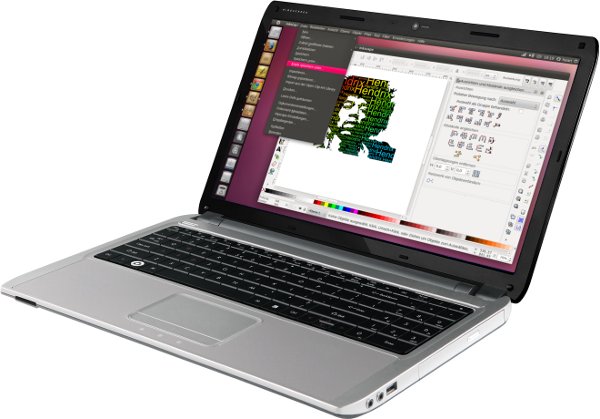
    With a 15.6″ screen, a dual-core i5 processor and 8GB of DDR3 RAM German company Rockiger‘s Satchbook might read like a MacBook Pro, but it comes with Ubuntu preinstalled.
    Rockiger isn’t a name I’ve heard before, but given the company is primarily focused on the German market that’s not surprising.
    Like most 15″ laptops the Satchbook isn’t the prettiest thing to look at. Its internals more than make up for this: -
    • 15.6” display (1366×768)
    • 2.3 GHz dual-core Intel Core i5 (Sandy Bridge) Processor
    • 8 GB 1333 MHz DDR3 RAM
    • Intel GMA 3000 graphics
    • 500 GB SATA hard drive running at 7200 rpm
    • DVD Burner
    • 6 cell battery (estimated at 8 hours run time)
    • German keyboard with numeric keypad and Ubuntu key
    Amongst the ports and extras are: -
    • HDMI out
    • Webcam
    • VGA out
    • 3 x USB
    • Audio in/out
    • 4-in-1 card reader
    • Ethernet
    • Bluetooth
    • WiFi b/g/n
    Rockiger also chuck in a cheat-sheet of keyboard shortcuts too – a commitment to the OS and its users that I can’t help but admire.
    The price? A rather pricey €997 ($1400/£900/AU$1320)
    10% of every laptop purchase is donated to open source applications, amongst them video editor OpenShot and word processor AbiWord.

    How does it compare to others in the market?

    It may be pricey, but are its competitors in the Ubuntu-laptop market?
    The System76 Pangolin Performance base unit boasts the same processor, the same screensize and the same graphics for just €494/$699. This ‘saving’ costs you 3/4 of the RAM and half the HDD size.
    What happens when you ‘configure’ the Pangolin to match the Satchbook? It still comes out cheaper, costing just $950/€675.
    For around the same price as the Satchbook (€971/$1370) System 76 offer the ‘Serval Professional’ (read our review of it here).
    The Serval Pro comes with a faster, quad-core i7 processor, the immensely powerful Nvidia GeForce GTX 560M GPU and 4GB of DDR3 RAM.

    To buy or not to buy, that is the question…

    With a unit to test I’m unable to provide any performance comparisons, but the specifications of the Satchbook will see Ubuntu fly on it. The price, however, likely won’t fly.
    Capable ‘Ubuntu laptops’ already command a premium over Windows-based versions.
    Rockiger should be commended for choosing Ubuntu and embracing open-source so whole-heartedly. Germans who can afford to ‘vote with their wallet’ wouldn’t find  Rockiger a bad name to choose.

    Gwibber review


    Gwibber – it may be Ubuntu’s default social client but do you use it? Chances are you don’t.
    For despite have a great feature set and support for almost every major social networking site, Gwibber has been tarnished with a reputation for being slow, laggy, resource hungry and a notification-nuisance.
    But come Ubuntu 11.10 Gwibber will be a very different beast.

    Gwibber Redux

    Gwibber 3.1 sees the social app get rewritten and redesigned. The Webkit interface of old has been traded for Vala and GTK3. the layout and look have been streamlined and the result is a fast, responsive and resource-efficient client.
    So why the change?
    The old python/webkit based client used way to much memory and it was rendered as a single static view which needed to be rendered each time anything changed.” Gwibber developer Ken VanDine told me when I asked about the reasons that led to the big revamp.
    “It was hard to improve the experience in the old client without significant changes, so moving to Vala and GTK3 seemed like a natural choice. We also wanted to share more infrastructure with the Gwibber Unity lens.”
    Big performance boost
    As an example of just how efficient the ‘new’ Gwibber is Ken told us of a test he did shared with us the results from a test he conducted using the clients.
    “The old client limited the stream to the latest 50 posts and would use about 150MB of RAM. The new client doesn’t limit the posts, in my test with 3000 posts in the stream it used about 42MB RAM.  
    Not only is that 3000 posts in a stream, we keep all the streams “hot” for fast switching between them. So we actually have them all created and hidden.”
    The result was more than noticeable when I took the the ‘new’ Gwibber for a spin earlier. Scrolling through Tweets is smoother, switching between views is faster and the appearance of new updates/tweets is far far quicker than Gwibber under Natty.

    Snap test

    I did take a quick at Gwibber’s resource usage whilst using the old client and then again under the new client. I left both open for the same amount of time (10 minutes) and both were tested under the same Ubuntu installation on the same computer.
    Old Gwibber used, combined, around 100MB of RAM. The new Gwibber? Just 32MB. Oh how my netbook will rejoice.

    A new look and new features

    Gwibber 3.1 comes with a new look designed by Canonical’s Neil J Patel.
    “From the start, the idea was to make a UI that would make people stop complaining about Gtk while making Gwibber the best client on Ubuntu. I think we’re slowly getting there.”
    Slick animations accompany button presses and view changes. This might sound like a small ‘blingy’ touch but it’s one that makes Gwibber 3.1 more than match up to the dominant Twitter apps available for OS X and Windows.
    Gwibber 3.1 also sees a number of much requested features implemented, such as sorting streams by oldest/newest posts first, and the planned search tool that ‘narrows what is displayed in the stream based on your search criteria’ sounds like a killer feature.
    As soon as Google release an API for Google+ I’m told that Google+ will be supported in Gwibber.

    Still in development

    With Ubuntu 11.10 yet to hit Alpha 3 its not surprising to find some key features are in the process of being added. The majority of the missing functions are expected to land in advance of The Ocelots release in October.
    And if all of the above hasn’t sold you on Gwibber 3.1 the following tidbit from Neil J Patel certainly should: -
    “It’s going to have the cutest/nicest error messages you’ve ever seen ;)”
     Gwibber 3.1 will land in Ubuntu 11.10 shortly